Select, evaluate, and facilitate the use of adaptive and assistive technologies to support student learning. (ISTE, 2011)
One of the areas we cover in detail during the SPU master’s program in Digital Education Leadership (DEL) is how to use adaptive and assistive technology to improve the learning experience of all of our students. Many of my colleagues believe that computer science education is somewhat immune to this problem, as we rely mostly on software that is already accessible. However, I have discovered that accessibility in computer science education has several, major issues that do not always meet the student’s needs.
“a11ylogo500”by Terrill Thompson is licensed under CC BY-NC-SA 2.0


Basically, the accessibility issue can arise on both the hardware and software side for computer science education. On the hardware side, an issue can arise due to the hardware requirements of software used for a specific programming course. I ran into this very issue in my Mobile programming course. Because of licensing and hardware issues, the mobile programming course focuses exclusively on Android devices. Applications for iOS (iPhones) can only be built using Apple’s MAC products, and my school uses computers running Microsoft’s Windows operating system. Since many students own only iPhones, they must use an emulator provided as part of the free, open-source Android Studio development environment. However, running both Android Studio and the emulator on the same Window’s machine requires a rather fast, recent processor as well as a large amount of memory and disk space. Some of my students do not have machines that are capable of running this combination of software. The school has recently upgraded some of the campus computers to be able to run this very configuration, offering some relief to students.
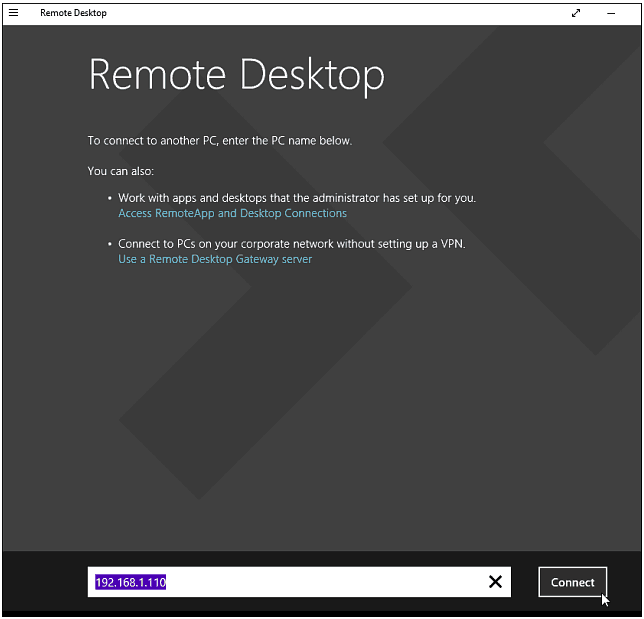
During the pandemic, the option of using a campus computer has been eliminated. I have worked with my IT staff in the past on how I can use a technology to access computers on the LWTech school network to help me better prepare for courses I teach. One of these solutions – Remote Desktop from Microsoft – provides a convenient solution for students that are not able to use campus computers. Specifically, students can use the remote desktop software on a Windows machine, a MAC, or even an Android or iOS mobile device to connect to a campus computer capable of running Android Studio and an emulator at the same time. Another great benefit of remote desktop is that the students do not have to install special software on their devices – they simply remote into a campus computer that has all of the required software. Since my IT department is already familiar with managing and maintaining the Remote Desktop software, this solution represented a win for all sides!
References
- International Society for Technology in Education. (ISTE; 2011). Standards for Coaches. https://id.iste.org/docs/pdfs/20-14_ISTE_Standards-C_PDF.pdf.