Coach teachers in and model design and implementation of technology-enhanced learning experiences using a variety of research- based, learner-centered instructional strategies and assessment tools to address the diverse needs and interests of all students. (ISTE, 2011)
I encountered the diverse needs of my student at the start of one of my computer programming courses. A student contacted me a few weeks before the course started asking if it is possible to take the course completely online, without the need to be physically present in the classroom. The student had a disability that made traveling difficult and participating in a 3-hour course impossible. I document this experience in my post on learning and leading online instruction in computer science.
The fact that I could not help this student for this course hit me hard. I did not want to turn away any student due to a disability. However, my programming course required attendance for lab exercises, lectures, and quizzes/exams. I did have the option of using a webcast option to relax the need for in-person lab time, but I did not have an online replacement for my lectures. I reached out to my fellow faculty, and soon discovered that no faculty member had this problem completely solved. A handful of instructors did record their lectures, but still required student be present in the classroom at lecture time.
Higher education has lagged behind K-12 education in adopting PBL. Pascarella and Terenzini (2005) indicated that while collaborative and constructivist approaches to teaching and learning have become more common in higher education over the past twenty years, the lecture model remains dominant. (Lee et al, 2014)
I now record all of my lectures for later viewing by my students. This relaxes the requirement that students be present during a lecture. This also has the benefit for all students in that they can review lecture material at their leisure, jumping to a particular topic in the lecture without the need to watch the entire video.
The only alternative that other faculty used for in-class quizzes and exams is a proctoring service that still requires students to come to the school campus. I am a bit surprised by this result, as my school has been using the Canvas learning management system for over 5 years. Canvas comes with a quiz tool that allows instructors to build online quizzes. The tool has different question types – true/false, multiple choice, matching, fill-in-the-blanks, essay, etc. The instructor simply marks the correct answer for all the non-essay question, and Canvas takes care of grading each submission and providing feedback to students. The instructors can also specify a fixed start time to take a quiz, as well as a total duration for the quiz.
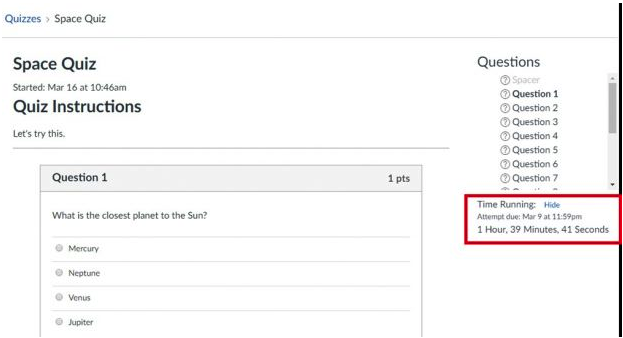
I have now updated quizzes and exams in my programming class to Canvas quizzes. I use Canvas timed quizzes as shown above. For exams, I use an open book, open notes format that allows students to complete the exam on their own computer. I realize that this solution is not perfect, and it is still possible for students to not submit their own work, but this represents best practices for exams in a remote learning setting.
References
- International Society for Technology in Education. (ISTE; 2011). Standards for Coaches. https://id.iste.org/docs/pdfs/20-14_ISTE_Standards-C_PDF.pdf.
- Lee, J. S. , Blackwell, S. , Drake, J. , & Moran, K. A. (2014). Taking a Leap of Faith: Redefining Teaching and Learning in Higher Education Through Project-Based Learning. Interdisciplinary Journal of Problem-Based Learning, 8(2). Available at: https://doi.org/10.7771/1541-5015.1426.