Model effective classroom management and collaborative learning strategies to maximize teacher and student use of digital tools and resources and access to technology-rich learning environments. (ISTE, 2011)
In my digital readiness project at SPU, I describe my first experience flipping the JavaScript/jQuery class at my school. This turned out to be a unique opportunity for me, as I was one of the first faculty members to experiment with a new classroom layout. The classroom included 6 small tables/pods, each with 5-6 chairs and a large monitor. The table also had 5 HDMI cables that the students could use to hook up a laptop. A cabinet of 25 laptops in the front of the room provided laptops for students that did not have their own laptop. This setup allowed each student to present on the large monitor to other students in the same pod. The classroom also had projector with a screen that could be tuned to any of the pod’s large monitors. This allowed students at any pod to present to the entire classroom.
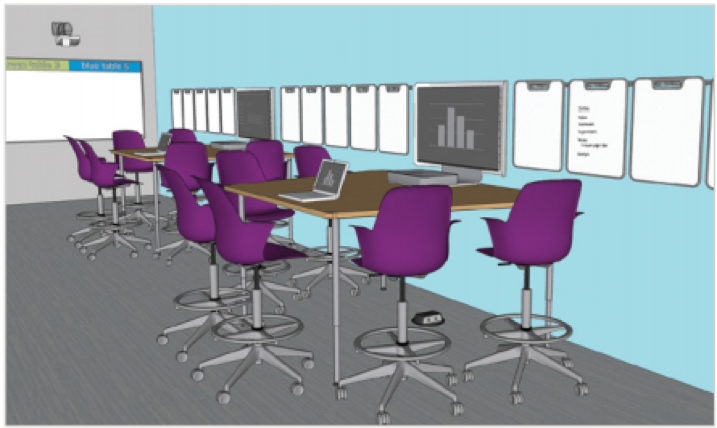
This classroom layout really got me thinking about how to make my class time more of about lab time rather than lecture time – one of my goals in flipping my classroom. I started to think about the best learning experiences for my students. The dean of my department had mentioned that several of my co-faculty had already explored a flipped classroom. I reached out to one of these faculty members and got some great ideas on how to run a flipped classroom for a computer programming course. Specifically, the faculty member suggested that I give each pod (a table with a large monitor) a unique problem to solve on a specific topic. This helped turn students at each pod into tutors for the other students in the same pod. I suggested that the student providing the help not just give the answer, but help lead the other student to the answer with a set of probing questions. If one pod finished early, I could instruct them to work on one of the other pod’s problems. This pretty much eliminated any down time for any of the pods.
The new classroom layout also allowed me to tour each table, assessing how each team was solving their problem. I would ask one member of each pod to present their solution. I would alternate the presenter on each class exercise, giving each student in the pod an opportunity to present to the entire class. In short, the new classroom layout allowed me to leverage technology in a more personal way, allowing each student to become more skilled at problem solving while also providing a powerful, collaborative learning environment.
References
- International Society for Technology in Education. (ISTE; 2011). Standards for Coaches. https://id.iste.org/docs/pdfs/20-14_ISTE_Standards-C_PDF.pdf.
- Steelcase, ‘Blended learning ideabook’, https://www.steelcase.com/content/uploads/2018/08/Blended-Learning-Ideabook-PDF.pdf
<< Previous: 3. Digital Age Learning Environments Next: 3B >>