
Collaborate with teachers and administrators to select and evaluate digital tools and resources that enhance teaching and learning and are compatible with the school technology infrastructure. (ISTE, 2011)
One of my assignments in my SPU master’s program was a digital readiness project in which we assessed how our school is using technology to improve education. I conducted two interviews for this project – one with the dean of my department and the other with the manager of engagement and learning. Both of this interviews presented me with an opportunity to collaborate with administrators on the use of technology at my school. The discussion with the manager of engagement and learning provided me the opportunity to discuss the use of different technologies for enhancing the teaching and learning experience at my school.
At the time, I was in the process of flipping one of my classrooms. I wanted to spend more lab time with students in the classroom and have students watch lectures on their own time outside of the classroom. For the past three academic years, I have been using the Panopto video recording tool to record my lectures. The Panopto feature that is most important to me is the ability for Panopto to synch my lecture with the Powerpoint slides. This allowed students to jump to the exact spot in the video covering a topic that they wanted to review.
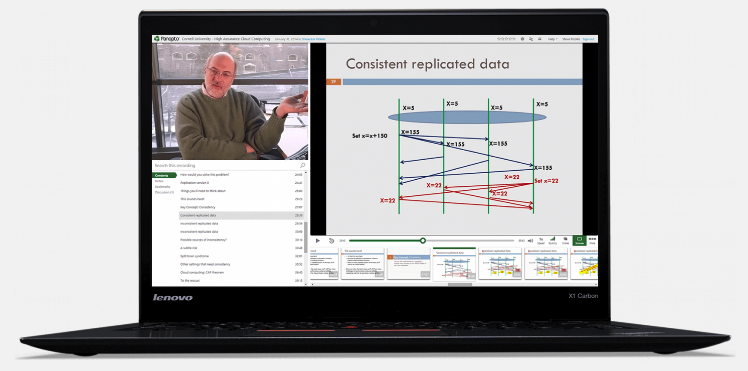
My discussion with the manager eventually got around to technology used in the classroom. One of the technologies that she was most excited about was the new video editing software Canvas Studio. I had reviewed this software before I decided on Panopto, and decided it did not meet my needs because of the inability to index the video by Powerpoint slides. The manager was not even familiar with the PowerPoint indexing feature in Panopto. I did agree with the manager that the video editing features in Canvas Studio were better than the editing features in Panopto. However, both of them were clunky and tedious compared to desktop video editing software – which is what I use with Panopto. This was a very fortunate conversation for me, as the manager was considering letting our Panopto license expire. After our discussion, she decided to carry both products for an evaluation period to see if other educators preferred one product over the other. I also offered to give a demonstration of Panopto to faculty, and show how students can use the PowerPoint indexing feature to improve their learning experience.
References
- International Society for Technology in Education. (ISTE; 2011). Standards for Coaches. https://id.iste.org/docs/pdfs/20-14_ISTE_Standards-C_PDF.pdf.